Skip to content





Have you ever imagined: How does a flat paperboard sheet transform into a perfectly shaped box with precise dimensions?
This all happens because of the dieline cuts or printing, which come into play when you need snug-fit packaging boxes.
At Silver Edge Packaging, we provide you with functional and cost-effective snug-fit packaging derived from the dieline while making it eco-friendly. We offer packaging solutions that cut, fold, and assemble the packaging material based on accurate dielines.
This approach makes your product packaging look great while improving its functionality to enhance the overall product presentation. But… what does it even mean? Why are businesses going crazy for this packaging?
Thereby, we have compiled this guide on the dieline technique to help you understand how we create perfect boxes and how you can calculate the exact measures for your packaging needs.
What is a Dieline in Packaging? A Simple Definition
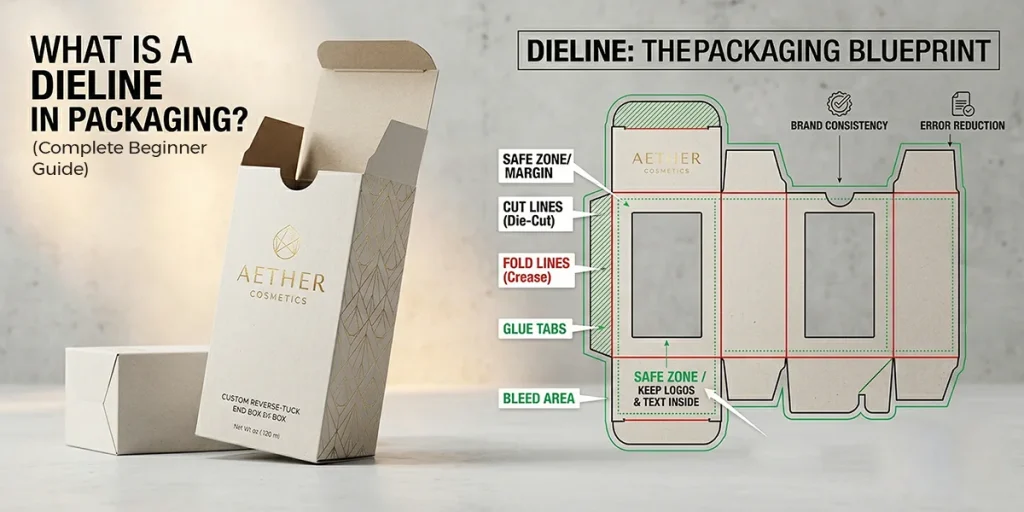
A dieline is a 2D technical drawing that shows the correct way to perform all three rituals (cut, fold, and assemble) for better marketing and protective results.
In simple terms, a dieline is a template that serves as a guide for packaging manufacturers and printers to cut packaging material correctly. You can take these guidelines as a map of any snug-fit packaging solution that suits your product.
It indicates some of the most important things to do for manufacturers, such as:
- Where to cut the material
- Where to fold it
- Where to apply glue
- Where the artwork should be placed
Dielines are the vital characteristics in most of the packaging types to enhance your product’s presentation. Such types of packaging include folding cartons, corrugated boxes, labels and stickers, and custom packaging designs.
These dieline techniques help businesses reduce their material waste up to 20% and offer maximum dimensional accuracy. However, all the materials used (kraft, cardboard, rigid, and corrugated paper) are eco-friendly and recyclable, but saving the waste can be a cost-efficient way.
Are Die and Dieline the Same in the Packaging Industry?
No, die, and dieline are not the same in the packaging industry, as die is a custom-made metal tool used to shape, cut, and mold packaging materials. On the other hand, dieline is a process of cutting and shaping these materials to given dimensions.
A dieline is a 2D digital template or blueprint of any packaging box.
How To Create A Dieline? A Step-By-Step Guide
Innovation and technical precision are the core of a dieline for any packaging type. If you miss one, your design or packaging won’t be the same forever.
Thereby, we come up with this step-by-step guide on creating a dieline for packaging:
- Choose Packaging Type: Choose your packaging type, whether a box, label, or sleeve, because the die must be created to suit the packaging solution.
- Define Dimensions: Measure your product’s dimensions accurately, including measuring the size of the box, bag, or sleeve, then get the Length, Width, and Height.
- Use Design Software: Design tools help you to create the most precise and custom dieline. AI (Adobe Illustrator) and CAD are popular software for creating precise vector-based packaging designs.
- Add Technical Lines: Add some technical lines to the dieline, such as cut lines, fold lines, bleed, and glue tabs.
- Export Print-Ready File (AI/PDF): Your dieline is almost ready to be implemented. Now save it and share it with us for smooth production.
What Does a Dieline Include in the Packaging Process? 6 Core Components
A dieline is a combination of 6 core technical elements, which compile the whole packaging process in a simple and one-way manner. Every single one of them is important and plays a critical role in packaging designs while maintaining the production line.
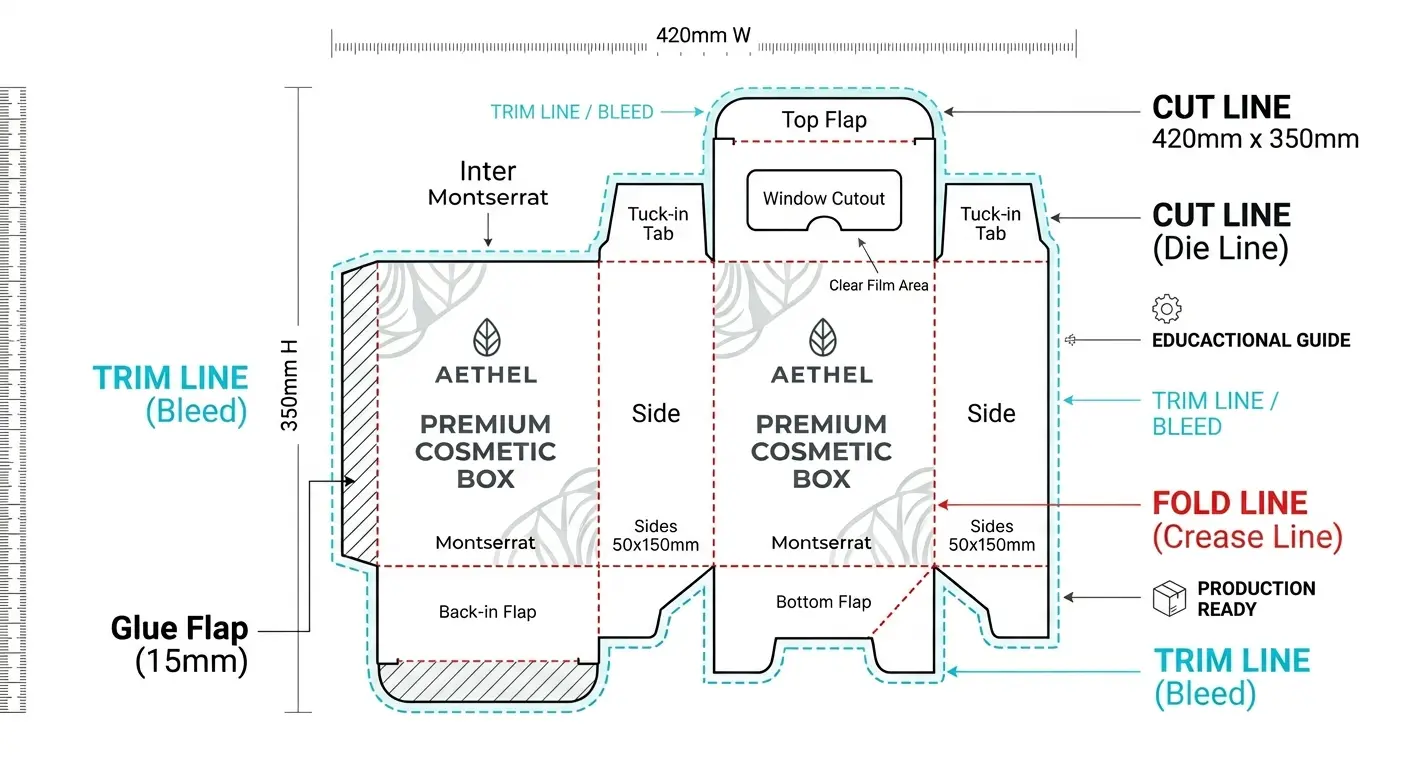
Here are the six core elements of a Dieline:
1. Cut or Trim Lines
Cut or trim lines indicate where the box, sleeve, or label will be cut to its accurate and precise dimensions to create a snug-fit structure. These lines are shown by a solid line that represents the final shape of a packaging solution.
Further, these lines guide the die-cutting machines to an accurate pattern during the cutting process. Without cut or trim lines, there will be no packaging in the perfect shape while increasing the environmental impact because of enhanced impact.
2. Fold or Score Lines
Fold or score lines indicate where the packaging will be folded without losing the dimensional and size accuracy. These lines are represented by the dashes or the fold lines that help us create the box’s structure and shape while reducing the cracking on the printing surface.
As we work with eco-friendly materials, whether paperboard, kraft, or corrugated cardboard, these lines provide you with the accurate point to fold the boxes. Further, these boxes are really sensitive to improper folding, which can enhance the hazards.
3. Bleed Area
After cutting lines, there will be an extra space outside of the box’s lines, which is called a bleed area in packaging terms. Generally, the bleed area is extended 3-5 mm beyond the trim line to prevent white edges outside the cutline.
That specific area prevents full-color coverage during the printing process. Research has shown that a proper bleed-area setup can minimize print defects by up to 60% during the mass production of customized packaging boxes.
4. Safe Zone or Margin Area
A safe zone, or margin area, is the space where important and valuable content, such as text or logos, should stay far from the edges. As the name suggests, it’s a safe zone that prevents accidental trimming and improves the readability of brand names, messages, and product information.
Margin area expresses the packaging’s professionalism and brand consistency of a business to stay competitive in the market.
5. Glue Tabs
The area where adhesive tape or glue is applied is called the glue tabs. This allowed packaging solutions to assemble perfectly without losing integrity. No special printing of any kind is applicable to this area.
A solid, recyclable material-made box can easily lose its integrity only if the glue tab is placed incorrectly.
6. Perforation Lines
Perforation lines are used to facilitate easy tearing without damaging the other part of the packaging solution. These lines are shown as dotted or dashed lines, with multiple cavities of the cuts to enhance the brand precision.
This type of packaging is popular for retail and food products because of its incredible presentation and FDA approval, which ensures the packaging process goes well. These lines increase confidence to cut the box pieces while improving your customers’ unboxing experience, and enhancing product representation.
Why Are Dielines Important in Packaging and Designs?
Dielines are vital for efficient, proper, and sustainable packaging production, without being limited by industrial constraints.
Here are some of their benefits:
- Ensures Accurate Printing: Dielines ensure accurate and error-free printing, while aligning custom artwork and graphics to the structure of the box.
- Prevents Costly Errors: Dielines help you to avoid the expensive manufacturing and printing errors.
- Helps Visualize Final Packaging: Visualizing packaging helps brands decide whether to get it. It is only possible with a dieline.
- Supports Mass Production: Dielines ensure consistency across the large batches and speed up the manufacturing process. In automated factories, the dielines are the backbone of smooth, continuous production.
- Improves Unboxing Experience: Dielines ensure the proper folding and structure that enhances the product protection and presentation.
What Are The Vital Tools Used To Create Dielines?
As an expert custom box manufacturer, you may need several tools to create a dieline on the preferred material. Here are some of the most incredible tools that help us to create an innovative dieline for any kind of product packaging.
- ArtiosCAD: Industrial-standard ArtiosCAD stays at the top of the list. This magnificent tool is known for its advanced structural design approach and supports complex packaging. There is a limitation that only a professional team, from design to the cutting of the box.
- Adobe Illustrator: Illustrator is another important and highly efficient technology tool, which is especially for designers. For designing, it is beyond limitations to create the whole packaging design while supporting vector graphics.
- Esko Studio: If you want 3D visualization in a dieline and perfect mockups for any design, then Esko Studio is the best option. You can enhance your packaging appeal and design accuracy by using this design tool.
- Online Dieline Generators: Last but not least, online dieline generators are perfect for beginners to save on the golf or circuit. This packaging solution is used to produce the quick templates of any simple design in the blink of an eye.
Before You Go
What are dielines, and what is their purpose? If you think they are just prolonging or complicating the packaging process, you are wrong. Tell you that it is a dieline that ensures the accuracy, functionality, and visual appeal of the custom packaging box.
Today, the whole world is focusing on eco-friendly and biodegradable packaging solutions. If you understand the functionality and importance of dieline in packaging, then you can experience the striking results such as,
- You can create better-looking packaging designs
- Minimize the risk of costly mistakes
- Support the sustainable packaging practices.